Harvestia Wiki
Important Info
- Harvestia is a VANILLA Minecraft Server.
- We run exclusively on version 26.1.2.
- Harvestia is not a competitive server. We are here to relax~
- We have a unique set of rules so please read them!
- If you have any questions or issues please ask in our Discord.
You have Crates and Ranks, is your server P2W?
No. Harvestia isn't a competitive server and as such, chasing baltop or rushing economy does nothing. While ranks do give bonus features and exclusive items, there are many ways to earn the same or similar for free! It is hard to say Harvestia will ever be "p2w" as there is no winning. We believe it is best for players to simply get comfy and enjoy the company on our server~
Farming
Farming is one of the best ways to earn money and gather resources in Harvestia. Grow crops, expand your fields, and harvest your produce to sell for profit.
Getting Started
To begin farming, obtain seeds by punching short grass~ You can get vanilla seeds AND custom seeds! If you break tree leaves you can get unique fruits, and punching bushes can give you berries~ Crops will grow over time and can be harvested once fully matured. On Harvestia we added something custom that allows you to harvest crops even easier: Simply right-click them! No need to replant.
Eventually you will find yourself making larger and larger farms, and even auto-farms! Please be mindful that while we encourage auto-farming (via redstone machines), we want people to be mindful of server performance.
Tips
- Keep farmland hydrated with nearby water (4 block range).
- It's encouraged to build BIG farms!
- Right-click crops to harvest without breaking the crop.
- Explore custom crops for higher sell values!
Why Farm?
Farming provides a steady source of income and is an excellent activity for both new and experienced players.
Fishing
Fishing in Harvestia goes beyond vanilla Minecraft with a collection of custom fish to discover, collect, and sell. With McMMO's Fishing skill, and an entire overhaul to the vanilla loot, there is lots to explore!
Custom Fish?
Cast your line into any suitable body of water for a chance to catch unique fish species. Each fish has its own size, rarity, and value.
Fishing Contests
Every 3 hours, a Fishing Contest begins automatically and lasts for 10 minutes.
During the contest:
- You are strictly limited to Contest Rods. Simply speak to the Fisherman NPC at "/warp fishing"!
- Larger fish are what count towards winning!
- Contests REQUIRE a minimum of 3+ participants in order to earn rewards, so encourage friends to join!
- Compete against others to get 1st, 2nd or 3rd on the leaderboard.
- Rewards are given to 1st, 2nd and 3rd place.
Pro Tips
- Try to fish for the full 10 minute duration to improve chances of larger catches.
- Sell your inventory if it gets full! It saves throwing fish everywhere~
- Join contests as often as you can! The rewards are worthwhile.
Why Fish?
Fishing is a relaxing and rewarding activity that offers a unique way to earn money, compete with other players, and expand your collection of custom fish.
Commands
Below are some commands commonly used by players across the server.
General Commands
- "/spawn" - Return to spawn.
- "/wiki" - Get a link to this Wiki~
- "/warps" - Get a list of warps available to you.
- "/warp (destination)" - Travel to available warp locations.
- "/rtp" - Teleport to a random location in the world.
- "/sethome (home name)" - Set a home location.
- "/home" - Teleport to your home.
- "/back" - Return to the last location you teleported from.
- "/vote" - Vote for Harvestia and gain rewards!
- "/ranks" - View the list of Ranks.
- "/rankup" - Try to rank up from your current rank.
- "/discord" - Get a link to our official Discord!
- "/link" - Link your account to Discord.
Economy Commands
- "/bal" or "/balance" - View your current balance.
- "/pay" - Send money to another player.
- "/sellall" - Sell your entire inventory of sellable items.
- "/sellhand" - Sell the item/items you're holding.
- "/worth" - Check the worth of the item you are holding.
Claim Commands
- "/claim (radius in blocks)" - Claim an area around you.
- "/expand" - Expand a claim you are standing in.
- "/abandonclaim" - Abandon the claim you are standing in.
- "/abandonallclaims" - Abandon ALL claims you own.
- "/trust (player)" - Trust a player to access the claim you are standing in.
- "/untrust (player)" - Untrust a player from the claim you are standing in.
You should have a book that explains how claims work, but to explain it simply: When you first place a chest, it will automatically claim an area around it. Hold a golden shovel while in the area to see the boundaries (gold and glowstone blocks). If you want to resize the claim, right-click a corner with the shovel. It should show "resizing claim" in the chat. Then simply right-click the new corner you wish to push/pull your claim to!
McMMO Commands
Premium Rank Commands
Compressed Ingots
Within the deeper parts of custom recipes, a lot of them use Compressed Ingots. Compressed Ingots come in 3 varieties: Iron, Gold and Obsidian. Each of them are used in advanced crafting such as Spawners, or Chunk Hoppers!
Compressed Iron Ingot
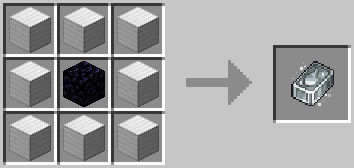
As you can see, Compressed Iron is made by compressing 8x blocks of iron around an Obsidian block. That's 72x Iron Ingots per!
Compressed Iron is used in a lot of low-tier custom recipes, for instance Passive Mob Spawners! It is also used in the recipe Filter Funnels~
Compressed Gold Ingot
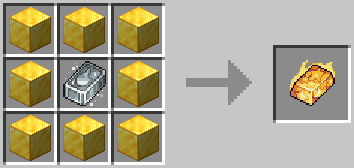
Similarly to Compressed Iron, Compressed Gold uses 8x blocks of gold. However it also requires a Compressed Iron in the middle. It is better to imagine a Compressed Gold Ingot as an "upgraded" Compressed Iron Ingot.
Compressed Gold is used in crafting mid-tier custom recipes, such as Hostile Mob Spawners and Chunk Hoppers!
Compressed Obsidian Ingot
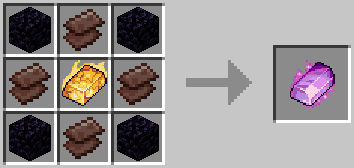
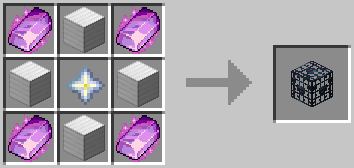
Compressed Obsidian Ingots are the most difficult, requiring 4x Obsidian blocks and 4x Netherite Scrap, along with a Compressed Gold Ingot in the middle.
Compressed Obsidian is used in advanced-tier custom recipes, such as Iron Golem Spawners or Wither Skeleton Spawners.
Chunk Hoppers
Chunk Hoppers automatically collect both vanilla and custom crops within an entire chunk, making resource collection easier than ever.
How They Work
When placed, a Chunk Hopper will gather nearby harvested crops and store them directly inside the hopper's inventory. You can place them above chests like normal hoppers. To see Chunk Boundaries press F3+G!
Benefits
- Collects vanilla and custom crops automatically.
- Reduces lag from excess items on the ground.
- Saves time and materials compared to traditional hopper systems.
Restrictions
Chunk Hoppers are limited to one per chunk, please keep this in mind!
How To Obtain One
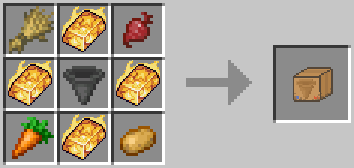
Chunk Hoppers can be crafted in game with Compressed Gold Ingots and a few crops. Details about Compressed Ingots can be found in the appropriate Wiki section!
Once crafted you will receive a box. Simply right-click while holding it, to open it up and gain a Chunk Hopper!
Filter Funnels
Filter Funnels are special blocks that act like a hopper but allow extra filtering options.
How They Work
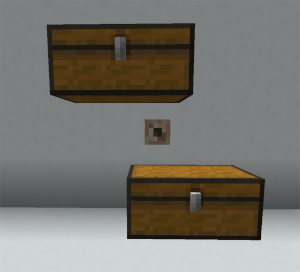
When placed below a container (Chests, Barrels etc), the Filter Funnel will take items from its above container and place them into a container below it. Similar to how Hoppers work! However, if you right-click the Filter Funnel, you will see a UI with options for filtering. Simply place the item you wish to filter (or NOT filter), set the blacklist or whitelist and thats it! You now have a compact way to split storage of items and make farming even more efficient!
Benefits
- Filters items from containers above, into containers below.
- Reduces lag by preventing players needing to use Copper Golems.
- Saves time and materials compared to traditional filter systems.
Restrictions
There are no restrictions, other than them being heavily experimental please be mindful and don't overuse them!
How To Obtain One
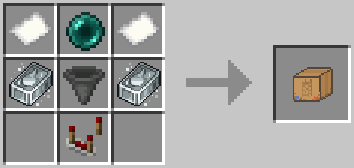
Filter Funnels, like Chunk Hoppers, can be crafted in game! They require 2x Compressed Iron Ingots, 2x Paper, a hopper, a comparator and an ender pearl! Details about Compressed Ingots can be found in the appropriate Wiki section!
Once crafted you will receive a box. Simply right-click while holding it, to open it up and gain a Filter Funnel!
Spawners
Spawners on Harvestia are craftable and help make mass-farming easier!
How To Craft?
All Spawners are categorised by their type and rarity. All Passive Mob Spawners are crafted using Compressed Iron Ingots, 4 of the mob's drops, and a Nether Star. For example, here is a Cow Spawner:
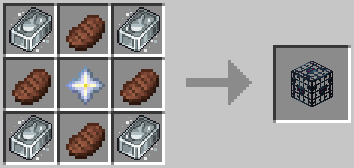
The next tier above those are the Hostile Mob Spawners. They are crafted similarly to Passive Mob Spawners, except they require Compressed Gold Ingots! Here is a Zombie Spawner:
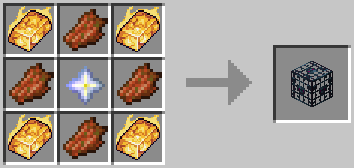
Lastly there is the final tier, which is reserved for over-powered mob spawners. They are crafted similarly to the other towards but require Compressed Obsidian Ingots instead of Iron or Gold! Here is an Iron Golem Spawner for example:
Multiple Spawners
We use a stacking plugin to make spawner block stackable! Each individual block can contain up to 16x Spawners in 1!
No AI?
You may have noticed that the spawned mobs don't move or interact. This is intentional! We disable mob AI to help alleviate server performance, meaning you can spawn many more mobs before it ever becomes an issue!!
Ranks
In-game ranks provide additional sethomes and kits. Premium ranks provide lots of extra features!
Basic Ranks
You can view ranks with the "/ranks" command. Each rankup will cost more money and playtime than the last, alongside some other occasional requirements like McMMO ranks. Simply use "/rankup" to try and rank up. If you don't meet the criteria, a chat message will be shown to you outlining what you are missing!
Premium Ranks
Harvestia has a couple premium ranks that give more benefits and features. They also help support and fund Harvestia without being excessively pay-to-win! More info can be found on our store page here
Custom Recipes
Harvestia features a variety of custom crafting recipes that expand beyond vanilla Minecraft.
Discover New Items
Custom recipes allow players to create useful crafting materials, Spawners, and unique server-exclusive content like Chunk Hoppers and Item Filters!
How To View Recipes
Most recipes can be viewed using the vanilla Recipe Book. Simply search for what you want, and it should show. Make sure to uncheck the "Showing Craftable" button too! Some recipes only unlock when you have picked up the required ingredients.
Examples
A great example of custom recipes are the Spawners! We've implemented a way to craft Spawners using Compressed Ingots and a Nether Star. For instance: A Cow Spawner is crafted using 4x Compressed Iron Ingots, 4x Cooked Beef and 1x Nether Star. Hostile Spawners (like Creepers) require Compressed Gold Ingots, which use Compressed Iron Ingots. It's better to look at them as a kind of tier-system!
Compressed Ingots are also new items with their own recipe too! Use the Recipe Book in a crafting table to find out how to make them~
Need Help?
Ask staff or fellow players if you're struggling to find a particular recipe!
Custom Crops and Food
We introduced new plants, ingredients, and farming opportunities not found in vanilla Minecraft.
What Are Custom Crops?
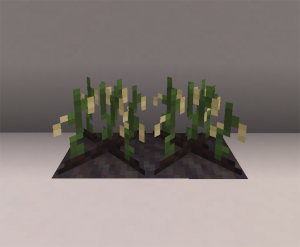
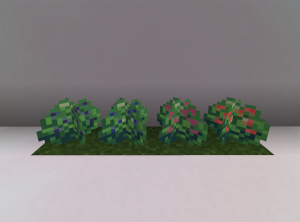
These special crops can be grown similarly to regular crops but often have unique appearances, uses, and yield new foods. You can find them by punching short grass and bushes, as well as breaking leaves of trees! Most seeds can be planted on farmland with the only exceptions being:
Rice - Plant Rice on mud blocks:
Berries - Plant on grass blocks:
Benefits
- Higher sell value compared to vanilla items.
- Unique crafting ingredients.
- Decorative farming options.
- Lots of custom food to make with custom crops!
Growing Tips
Custom Crops are a core part of Harvestia's farming experience and are highly recommended for aspiring farmers.
Sell Wands
SellWands provide a fast and convenient way to sell items from chests.
How To Use
- Obtain a SellWand either from Voting or from the Rare/Epic Crates.
- Right-click a chest containing sellable items.
- The items will be sold and a hologram will pop up showing basic info.
- The money is deposited directly into your balance!
Benefits
- Savves time when managing farms.
- Perfect for large-scale resource production.
- Eliminates the need to manually sell items.
Uses
SellWands have a limited number of uses. Check your SellWand's description to see how many charges remain. Rarer SellWands have higher uses!
Best Uses
SellWands are especially effective when paired with Chunk Hoppers and large storage systems.